
What Every Small Business Website Should Include
Your website doesn’t need to be flashy, complicated, or packed with every feature imaginable.
What it does need is the right information in the right places.
Many small business owners either throw together a website quickly or put so much focus on the design that they forget about the user experience. The result? Visitors leave without contacting you, booking a service, or making a purchase.
If you’re wondering whether your website has the essentials covered, here’s a simple checklist of what every small business website should include.
A Clear Description of What You Do
One of the biggest mistakes small business owners make is assuming visitors already know what their business offers.
When someone lands on your homepage, they should immediately understand:
- What you do
- Who you help
- How you can help them
Avoid vague phrases and industry jargon. Instead, use clear language that quickly answers the question:
“What does this business actually do?”
For example:
Instead of:
“We help businesses grow through innovative solutions.”
Try:
“We design websites and create social media content for small businesses.”
The clearer you are, the easier it is for potential customers to take the next step.
Easy-to-Find Contact Information
You’d be surprised how many websites make visitors hunt for a phone number or contact form.
Your contact information should be easy to find from any page on your website.
Consider including:
- Contact page
- Contact form
- Phone number
- Email address
- Social media links
- Business location if applicable
If someone is ready to reach out, don’t make them work for it.
Strong Calls to Action
A website shouldn’t leave visitors wondering what to do next.
Every page should guide users toward an action.
Examples include:
- Schedule a consultation
- Request a quote
- Contact us
- Book now
- Download a free resource
- Shop now
Without a clear call to action, visitors may leave without taking any action at all.
An About Page That Feels Human
People like doing business with people.
Your About page gives visitors a chance to connect with the person behind the business.
You don’t need a lengthy life story, but you should share:
- Who you are
- Why you started your business
- Who you help
- What makes your business different
For many small businesses, the personal connection is often what turns a visitor into a customer.
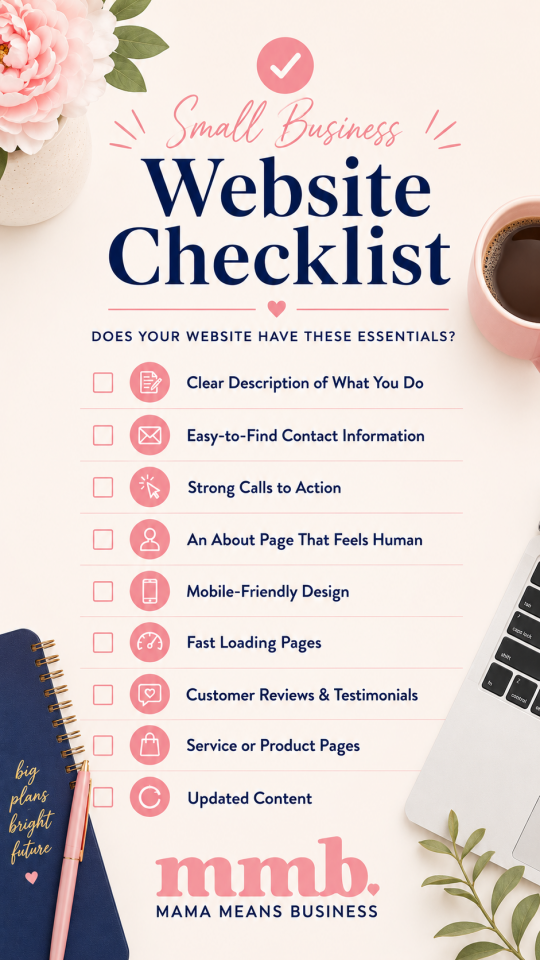
Mobile-Friendly Design
More people browse websites on their phones than ever before.
If your website is difficult to read, navigate, or use on a mobile device, you’re likely losing potential customers.
A mobile-friendly website should:
- Load properly on phones and tablets
- Have readable text
- Include easy-to-click buttons
- Display images correctly
- Make navigation simple
A great desktop experience means very little if the mobile version is frustrating to use.
Fast Loading Pages
Website visitors have very little patience.
If your website takes too long to load, many users will leave before they even see your content.
A few ways to improve website speed include:
- Compressing images
- Using quality hosting
- Limiting unnecessary plugins
- Keeping website software updated
Fast websites create a better user experience and can also help with search engine rankings.
Customer Reviews and Testimonials
Trust matters.
When potential customers see positive experiences from real clients, they feel more confident about working with you.
Testimonials can be added to:
- Your homepage
- Service pages
- Landing pages
- Dedicated testimonials page
Even a few genuine reviews can make a significant difference.
Service or Product Pages
Don’t assume visitors will figure out what you offer on their own.
Create dedicated pages that clearly explain:
- Your services or products
- What’s included
- Who they’re for
- Benefits
- Frequently asked questions
The more information you provide, the easier it becomes for potential customers to make a decision.
Basic SEO Foundations
Search engine optimization doesn’t have to be complicated.
Every small business website should have basic SEO elements in place, including:
- Keyword-focused page titles
- Meta descriptions
- Proper heading structure
- Image alt text
- Internal links
- Mobile-friendly design
These basics help search engines understand your website and improve your chances of appearing in search results.
Updated Content
An outdated website can create the impression that a business is inactive.
Take time to regularly update:
- Business hours
- Services
- Contact information
- Team information
- Blog content
- Portfolio projects
Keeping your website current shows visitors that your business is active and engaged.
Your website doesn’t need dozens of pages or expensive features to be effective.
A successful small business website focuses on clarity, usability, and helping visitors take the next step.
If your website clearly explains what you do, builds trust, and makes it easy for customers to contact you, you’re already ahead of many businesses.
Start with the essentials, keep things simple, and focus on creating a website that works for both your business and your customers.